I work on an agent communication SDK, open source, with nearly 1k stars on GitHub. It lets an AI agent talk to people on Slack, email, WhatsApp, Discord, Telegram, SMS and X. People message the agent where they already are, and it answers in the same thread.
Developers building their own agents use the SDK directly in their code. That works well for custom agents.
But a lot of people now work with agents that already exist: Cursor, Claude Code, Codex, OpenCode. You can't drop an SDK into those tools. What they all support is MCP.
So in August I built an MCP server for it. You add one URL to your agent's config, and the agent can connect Slack or email, see what people sent, and reply in the same thread. This post covers how it works, why it is stateless, and what I learned along the way.
01 What MCP is, and what just changed
MCP, the Model Context Protocol, is the standard way AI agents find and call external tools. A server publishes a list of tools with descriptions. The agent reads the list, decides which tool fits, and calls it.
Until recently, a remote MCP server was stateful. The client opened a session with an initialize handshake, the server handed back a session ID, and every later request had to carry that ID back to the same server. If you ran more than one server instance, you needed sticky sessions or a shared session store.
The 2026-07-28 revision of the spec removed that. No handshake, no session ID. Every request stands on its own and carries whatever it needs.
The timing suited us, because our server has nothing to remember between calls.
02 Stateless doesn't mean forgetting
"Stateless" sounds like nothing is remembered. That is not what it means here.
Messages still have to be kept somewhere. When someone mentions the bot in Slack, Slack sends that message to our backend right away, whether or not your editor is open. We check it came from Slack, drop duplicates, and store it. When the agent next asks, the message is there, the same way unread email waits in an inbox.
The MCP server itself holds nothing. It just answers requests.
| Stateful MCP (before 2026-07-28) | Our server | |
|---|---|---|
| Opening | initialize handshake | None. Any request can come first |
| Session | Mcp-Session-Id on every request | None |
| Who you are | Tied to the session | API key on every request |
| Scaling | Sticky sessions or a shared session store | Any instance can answer any request |
| Server restart | In-memory sessions are gone | Nothing to lose. Messages are stored |
03 How I built it
It is not a separate service. The MCP server is one module added to our existing API server, at /mcp. It uses the official Python MCP SDK in stateless mode.
Every tool is a thin wrapper around an endpoint our REST API already had. Authentication, limits and the actual sending logic stay in one place. If the MCP server had its own copy of that logic, the two would drift apart.
The API key travels in a header on every request, so the client config is just a URL and a header:
{
  "mcpServers": {
    "agent-comms": {
      "url": "https://<server>/mcp",
      "headers": { "Authorization": "Bearer <your key>" }
    }
  }
}
There are eight tools, and that is the whole surface:
get_startedcreates a free sandbox key, with no signupconnect_channelconnects email instantly, returns an authorize link for Slack and Discord, and takes a bot token for Telegramlist_channelsandlist_connectionsshow what is connectedinboxshows what people sentread_conversationreturns a full threadreplyanswers in the same thread and channel a message arrived onsend_messagestarts a new conversation
A new user has no key yet, so listing the tools and calling get_started work without one. Everything else needs a key. When it is missing, the error doesn't just fail. It tells the agent exactly what to do: call get_started, add the key to the config, and retry. The agent can usually fix it without the human reading any docs.
That is the general idea behind the design. The tool descriptions are the documentation. When a client connects, it reads them and hands them to the model, so the model learns how to use the server from the server itself.
04 Three things I learned
A 421 error behind a proxy
The first time I deployed it behind a public domain, every request came back with HTTP 421. The Python MCP SDK has DNS-rebinding protection on by default, and it only trusts localhost unless you tell it otherwise. Behind a reverse proxy, the public domain wasn't on the allowed list. The fix is to keep the protection on and add your own domain to it. If you deploy a remote MCP server and see 421s, check this first.
Resources couldn't see who was asking
MCP has resources as well as tools. My first version exposed conversations as a resource. But in the Python SDK I used, resources don't get the request headers, so it couldn't read the caller's API key. It always returned an empty list, which looked like "your inbox is empty" when it really meant "not implemented". I removed it. Anything that depends on who is asking is a tool now.
An empty result needs an explanation
The agent calls inbox to see what arrived. On Slack, the most common reason for an empty inbox is boring: installing the app to a workspace is not enough. The bot also has to be added to a channel, or messaged directly. Until then, it never receives anything.
So inbox never returns a silent empty list. When there is nothing, it says why: which channels are live, which are still being set up, which are waiting for someone to approve an install, and, for Slack, to run /invite @your-app in the channel it should watch.
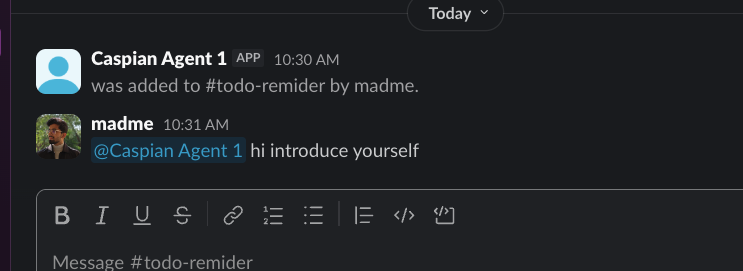
This came straight out of the first real test. A Cursor agent connected through the MCP URL could reply in that thread, but it had no way to see the mention on its own. Within the hour I added inbox, read_conversation, and these hints.
05 What it doesn't do yet
The agent only sees messages when it asks. There are no push notifications yet, so if nobody is using the editor, nothing gets answered. For an agent that must reply around the clock, you still build it with the SDK directly.
There is also no OAuth login for the MCP server yet, so you paste an API key. Both are next.
The server code is open source: github.com/TryCaspian/caspian-sdk.