The last few months, I was working on an open-source agent comms layer that hit ~1K GitHub stars and 35K+ message volume. The most interesting thing I built there? The Google Meet integration.
The pitch is simple: build a custom agent — LangGraph, the OpenAI Agents SDK, whatever you like — give it a Meet link, and it joins the call. For you, or for your customers. It listens, and actually talks back.
Sounds easy. Give a browser a link, done. It’s not. You can’t vibe-code this one. And the open-source “Meet bot” projects out there? They’ve only made part of it public — mostly the join/transcribe wrapper. The core architecture that actually makes an agent speak in a call stays hidden.
So here is how it actually worked.
01 Joining is browser automation
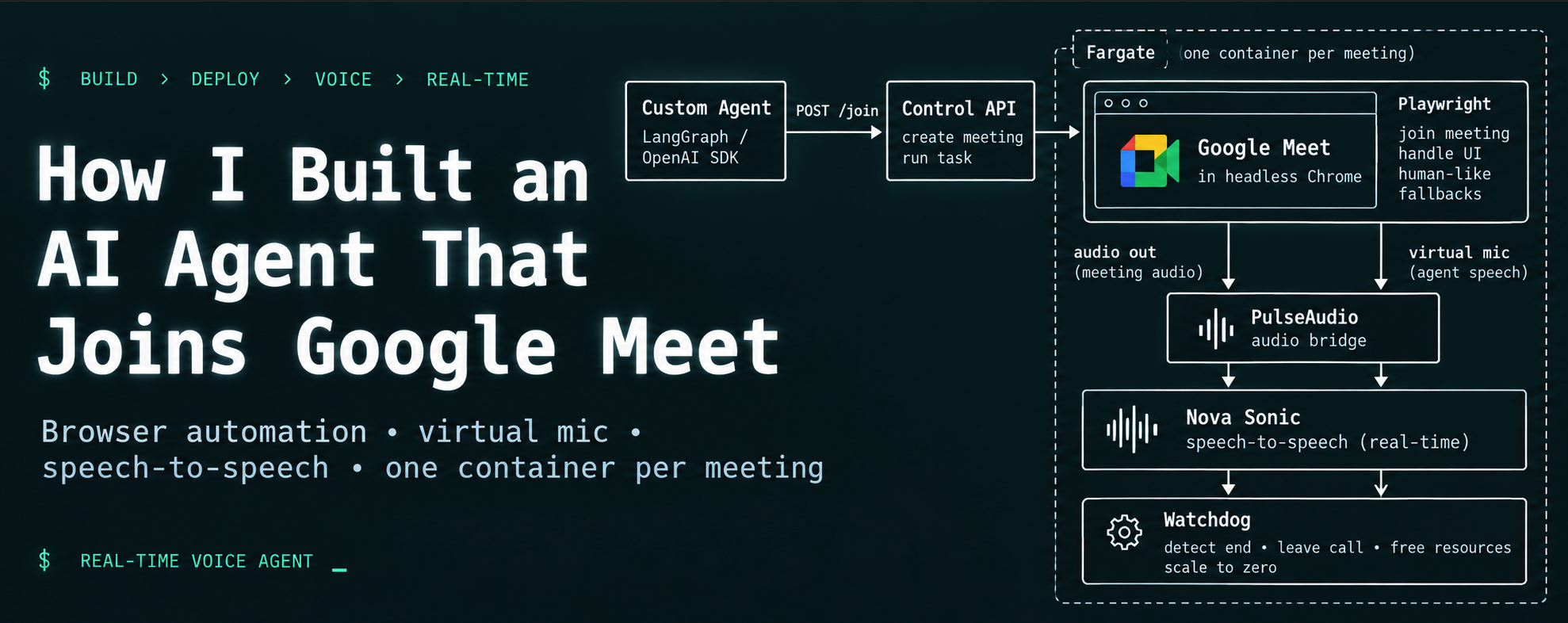
Meet has no bot API. So headless Chrome with Playwright, running on a virtual display, joins the way a human does: it opens the link, turns off the camera, and clicks Join. You also need fallback selectors everywhere, because Google constantly changes the Meet UI.
02 Identity is a pool
For calls that need a signed-in user, I kept a pool of pre-authenticated Google profiles in S3, leased through DynamoDB. That way many agents, across many customers, can be in different calls at once without clashing. There is also a guest-join fallback for open meetings.
03 The real wall: Meet has no audio API
There is no “play this audio into the call” API. The agent has to become a microphone for the browser. And if you just point Chrome at a fake device, it says “microphone not found.”
04 The fix is a virtual mic — the hidden part
A PulseAudio graph. One null-sink captures what the room says and pipes it out at 16 kHz. The model’s speech comes back at 24 kHz and gets piped into a virtual source that Chrome accepts as a microphone.
A bare .monitor source does not work — you need an actual
module-virtual-source. That one detail can cost you a day.
meet_out   (null-sink)   <- Chrome OUTPUT   -> parec 16k -> Nova
bot_mic    (null-sink)   <- Nova speech 24k
virtmic    (virtual-source on bot_mic.monitor)  -> Chrome INPUT / mic
05 The brain is speech-to-speech, not a pipeline
No STT → LLM → TTS chain — too slow, and turn-taking becomes your problem. I used Amazon Nova Sonic: audio in, audio out, all through one bidirectional stream. It handles turn-taking itself, and you can cut the agent off mid-sentence and it stops.
06 One container per meeting
Each call gets its own display, audio graph, browser, and Fargate container. It joins, talks, and shuts itself down when the call ends — with a watchdog and a hard session cap so nothing runs forever. And it scales to zero.
07 The takeaway
That is the whole thing. The join is the easy 20%. The audio bridge, the speech loop, and the pooled identity are the 80% nobody open-sources. Genuinely one of the most fun things I have built.